

.NET 10 is a Long-Term Support (LTS) release, and it is the version most teams should move to now. Microsoft released it on November 11, 2025 and will support it until November 14, 2028. The bigger reason to act is that .NET 8 and .NET 9 both reach end of support on November 10, 2026. After that date, neither version receives security patches.
This guide covers what changed in the runtime, C# 14, ASP.NET Core 10 and the tooling, and how to move an existing project over without surprises. Technical terms are explained as they appear, so you can also share it with colleagues who make version decisions but don’t write code.
Contents
- .NET 8, 9 and 10 support dates at a glance
- What LTS means, and why it matters here
- Runtime and performance improvements
- C# 14: smaller syntax changes with real impact
- ASP.NET Core 10: security and API improvements
- Tooling: containers without a Dockerfile
- A note on AI libraries for .NET
- How to upgrade to .NET 10
- Common upgrade mistakes
- Which version should you run?
- Frequently asked questions
- Sources
.NET 8, 9 and 10 support dates at a glance
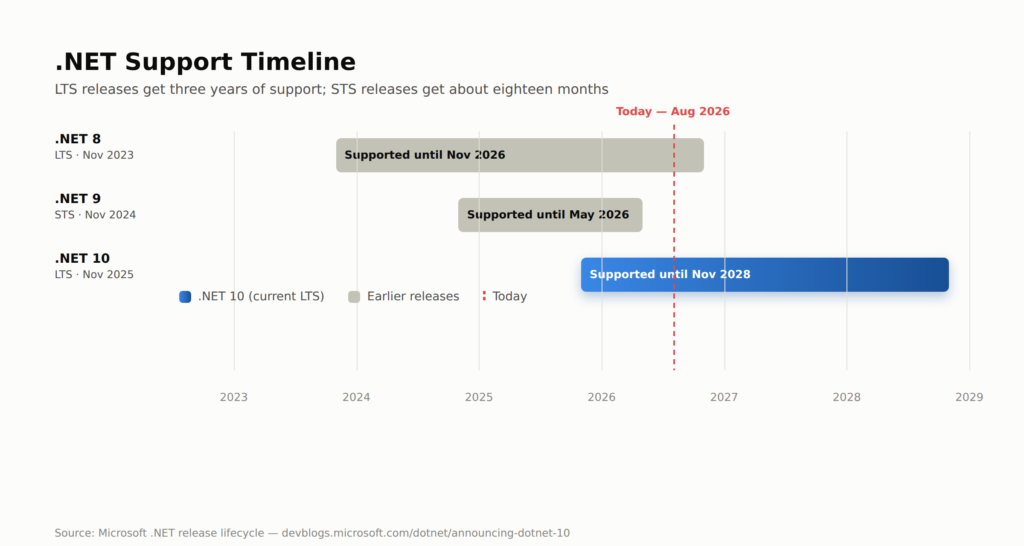
Here is how the three current versions compare. Support ends on Microsoft’s Patch Tuesday, the second Tuesday of a month, which is why the end dates fall on the 10th and 14th rather than on the anniversary of release.
| Version | Release type | Released | End of support |
|---|---|---|---|
| .NET 8 | LTS | November 2023 | November 10, 2026 |
| .NET 9 | STS | November 2024 | November 10, 2026 |
| .NET 10 | LTS | November 2025 | November 14, 2028 |
What LTS means, and why it matters here
Microsoft ships a new major version of .NET every November and alternates between two kinds. Even-numbered releases such as .NET 8 and .NET 10 are Long-Term Support (LTS) releases, supported for three years. Odd-numbered releases such as .NET 9 are Standard-Term Support (STS) releases. STS used to mean 18 months of support. Microsoft extended it to 24 months, which is why .NET 9 now expires on the same day as .NET 8 instead of six months earlier.
For planning, this means .NET 10 is the sensible default for new client work, new APIs and any application that has to stay stable for years. It also means that teams on .NET 8 or .NET 9 face one shared deadline rather than two separate ones.
Applications on an unsupported version keep running. What stops is security patches and technical support from Microsoft, and that is the real risk for anything exposed to the internet.
Runtime and performance improvements
Most of the .NET 10 runtime work happens inside the JIT (just-in-time) compiler, the part of .NET that turns your compiled code into machine instructions while the app runs. According to Microsoft’s documentation, the release improves inlining (copying a small method’s body into its caller to avoid call overhead), method devirtualization (resolving which method will run ahead of time), code generation for structs, and loop optimisation.
One change is easy to explain. .NET 10 can allocate small arrays on the stack instead of the heap when the compiler can prove the array never outlives the method that created it. Fewer heap objects means less work for the garbage collector, which is the part of the runtime that frees unused memory.
Two points are worth knowing before you promise anyone a speed-up:
- AVX10.2 support exists but is switched off by default. It adds instructions for a newer family of processors, and Microsoft’s documentation says the JIT support stays disabled until capable hardware is available. You will not see a benefit from it today.
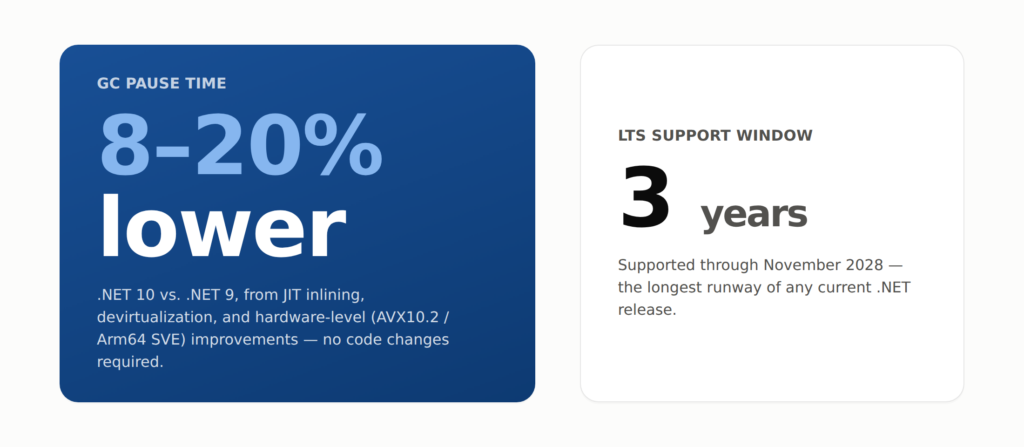
- Gains depend on your workload. Microsoft does not publish a single figure for how much faster a typical application gets. Benchmark your own service before and after the upgrade instead of relying on a headline number.
NativeAOT (ahead-of-time compilation that produces a self-contained native executable) also improves in this release. It is worth testing for serverless functions and containers where fast start-up matters, but it comes with restrictions on features such as reflection-heavy code, so treat it as an opt-in experiment rather than a default.
C# 14: smaller syntax changes with real impact
C# 14 ships with .NET 10 and is the default language version for projects that target net10.0. It is not a headline release like records or pattern matching were, but a few additions remove boilerplate you probably write every week.
Field-backed properties
The new field keyword lets a property use its compiler-generated backing field directly. You no longer need to declare a private variable just to add a small check.
public class Order
{
    public decimal Total
    {
        get => field;
        set => field = value < 0 ? 0 : value;
    }
}
Here the setter clamps negative totals to zero, and there is no _total variable to maintain. One caution: if an existing class already has a member named field, the new keyword can change what your code means. The compiler will warn you, so review those warnings during the upgrade.
Null-conditional assignment
The ?. operator already let you read from something that might be null. In C# 14 you can also assign through it.
// Before C# 14
if (customer != null)
{
    customer.LastLogin = DateTime.UtcNow;
}

// C# 14
customer?.LastLogin = DateTime.UtcNow;
If customer is null, nothing happens, and the right-hand side is not evaluated.
Extension blocks
Extension methods have always let you add methods to a type you don’t own. Extension blocks group these additions and also allow extension properties, which were not possible before.
public static class StringExtensions
{
    extension(string text)
    {
        public bool IsBlank => string.IsNullOrWhiteSpace(text);
    }
}

// Usage
if (userName.IsBlank)
{
    // handle missing input
}
Other C# 14 additions
C# 14 also adds broader implicit conversions between arrays, Span<T> and ReadOnlySpan<T> (types for working with memory without copying it), nameof support for unbound generic types such as nameof(List<>), and lambda parameters that can carry ref, in or out modifiers without spelling out the type. None of these is dramatic alone, but together they trim code that many teams have been writing by hand for years.
ASP.NET Core 10: security and API improvements
ASP.NET Core is Microsoft’s framework for building web applications and APIs. Version 10 adds several features that web developers will notice quickly.
- Passkey support in ASP.NET Core Identity. Passkeys are a password-free sign-in method built on the WebAuthn and FIDO2 standards. You can now offer them without a third-party library.
- Built-in validation for Minimal APIs. Minimal APIs are the lightweight way to define endpoints without controller classes. Validation of query parameters, headers and request bodies now works out of the box (enabled with
AddValidation), which removes one common reason teams went back to MVC controllers. - OpenAPI 3.1 support. OpenAPI is the standard format for describing an HTTP API so that tools can generate documentation and client code. Version 3.1 is now supported, with better XML-comment integration.
- Server-Sent Events.
TypedResults.ServerSentEvents()gives you a first-class way to stream one-way updates from server to browser, without adding SignalR when you don’t need two-way communication.
Blazor, Microsoft’s framework for building web interfaces in C#, also gets load-time improvements and a [PersistentState] attribute that makes it simpler to keep component state when a page moves from prerendering to interactive mode. Check the official ASP.NET Core 10 release notes for the exact behaviour before relying on it in production.
Tooling: containers without a Dockerfile
The .NET SDK can now build a container image for a console app directly, with no Dockerfile. It uses the same publish-based approach that web apps already had:
dotnet publish -t:PublishContainerTwo other additions reduce setup effort for small jobs. File-based apps let you run a single .cs file with dotnet run and no project file. The dnx command runs a .NET tool once without installing it permanently. Together they make scripts, prototypes and small services quicker to start.
A note on AI libraries for .NET
You will see .NET 10 mentioned alongside Microsoft’s AI tooling, so it helps to know how the pieces fit. Microsoft.Extensions.AI defines a common IChatClient interface, so the same calling code can work with different model providers. It is a NuGet package that ships on its own schedule, not part of the .NET 10 runtime itself. The Microsoft Agent Framework, which builds on it, is also a separate package family and reached version 1.0 in April 2026.
In practice, that means .NET 10 is a solid foundation for this kind of work, but the AI libraries are versioned and supported separately from the LTS runtime. Check each package’s own status before you commit to it. A dedicated article on this topic will follow in this series.
How to upgrade to .NET 10
For most projects, the move is a short list of changes. This checklist assumes you are coming from .NET 8 or .NET 9.
- Install the .NET 10 SDK from the official .NET download page on your machine and your build servers. If you use a
global.jsonfile, update the pinned SDK version. - Change the target framework in each project file:
<PropertyGroup> <TargetFramework>net10.0</TargetFramework> </PropertyGroup> - Update NuGet packages. Microsoft packages such as ASP.NET Core and EF Core have .NET 10 versions. Check each third-party library you depend on, because a library that has not been updated is the most common blocker.
- Update container images and hosting. Change base images to the 10.0 tags, for example
mcr.microsoft.com/dotnet/sdk:10.0for building andmcr.microsoft.com/dotnet/aspnet:10.0for running. Confirm that your hosting platform, such as Azure App Service or your Kubernetes base image, offers a .NET 10 runtime. - Build and run your tests before changing anything else. New compiler warnings, nullable reference type warnings and analyzer changes cause most of the build noise.
- Read the breaking-changes list for your app type (ASP.NET Core, EF Core, WinForms, WPF) on Microsoft Learn. If you are skipping .NET 9, read that version’s list too.
- Deploy to a staging environment first and compare response times and memory use against your current version.
Common upgrade mistakes
- Upgrading the project but not the pipeline. A build server without the .NET 10 SDK fails in ways that look like project errors.
- Forgetting the runtime image. An app built for .NET 10 will not start on a host that only has the .NET 8 runtime.
- Ignoring new warnings. Warnings about the
fieldkeyword or nullable references can point to real behaviour changes. - Waiting for the deadline. Teams that start in October often discover a blocked dependency with no time left to replace it.
- Assuming a speed-up without measuring. Test with your own traffic patterns.
Which version should you run?
| Your situation | Recommendation |
|---|---|
| New project or greenfield API | Start on .NET 10. |
| Production app on .NET 8 | Plan the move to .NET 10 now. Support ends November 10, 2026. |
| Production app on .NET 9 | Move to .NET 10. It has the same end date as .NET 8 and a shorter jump. |
| App with a dependency that does not support .NET 10 yet | Raise it with the vendor, look for a replacement, and decide how to handle the gap before November. |
.NET 10 gives you a supported base until late 2028, a set of C# 14 improvements that reduce routine code, better built-in options for authentication and API validation, and simpler tooling for small services. The main task now is scheduling the upgrade before the shared November 10, 2026 deadline.
Frequently asked questions
Is .NET 10 a Long-Term Support release?
Yes. .NET 10 is an LTS release, published in November 2025 and supported through November 14, 2028.
When does support for .NET 8 and .NET 9 end?
Both versions reach end of support on November 10, 2026. Microsoft extended STS support from 18 to 24 months, which moved .NET 9 to the same date as .NET 8.
What happens if I stay on .NET 8 or .NET 9 after November 10, 2026?
Your applications keep running, but Microsoft stops issuing security updates and technical support for those versions. Any new vulnerability would stay unpatched.
Can I upgrade directly from .NET 8 to .NET 10?
Yes. You can change the target framework straight to net10.0. Review the breaking-change lists for both .NET 9 and .NET 10, since you are absorbing both releases at once.
Do I have to rewrite my code to use C# 14?
No. Existing code keeps working, and you can adopt features such as the field keyword gradually. Watch for compiler warnings if you have a member named field.
Is .NET 10 faster than .NET 9?
The runtime includes many JIT and memory-allocation improvements, but the size of any gain depends on the application. Measure your own workload rather than relying on a general figure.